Ticketing System Integration for Customer-Facing SaaS Features
Choose the integration pattern that matches how deeply ticket data feeds your product decisions.
Integrating a ticketing system into a customer-facing SaaS product is an architectural decision. Choices around data flow, API design, and workflow ownership can strengthen retention or add a coordination tax. The right integration preserves customer context, makes responsibility explicit, and returns useful signals to the product.
Why the ticket is the wrong unit of analysis for SaaS integration decisions
“Add a support widget to the dashboard” sounds like a contained feature request. But the request crosses boundaries between the product, support, engineering, success, and billing. What looks like a form is really a data contract, carrying session state, account health, entitlements, and dependencies between teams. When that contract leaves context behind, people must reconstruct it before they can solve anything.
Front's Coordination Tax report found that the typical B2B company spends nearly three hours getting people and work lined up for every hour spent solving customer problems. That is a lot of passing the parcel before anyone opens it. A ticket count cannot show whether an integration preserves the information needed to resolve those problems. The architectural questions come first, namely where ticket state lives, who owns it, and how it flows back into the product.
What the data model of a customer-facing ticket actually looks like
A customer-facing ticket needs relationships to the account, user, subscription state, product event history, and resolution workflow. Without those relationships, a support request may describe the problem but omit the conditions that explain it. A unique ticket ID, status, priority, owner, and full conversation history make the request trackable. Account tier, contract entitlements, usage signals, and CRM relationship data make it useful in a SaaS context.
The same object also supplies SLA enforcement, knowledge base generation, agent workload balancing, and product analytics. If the design leaves out those uses, each downstream team needs its own layer to pull the data out. Email, live chat, in-app messaging, and Slack must therefore converge on the same ticket object without forking its history. Otherwise, one customer conversation becomes several partial records, each confidently missing something important. The data contract must preserve both the issue and its continuity as work moves across channels and teams.
Three integration patterns and the tradeoffs each one makes
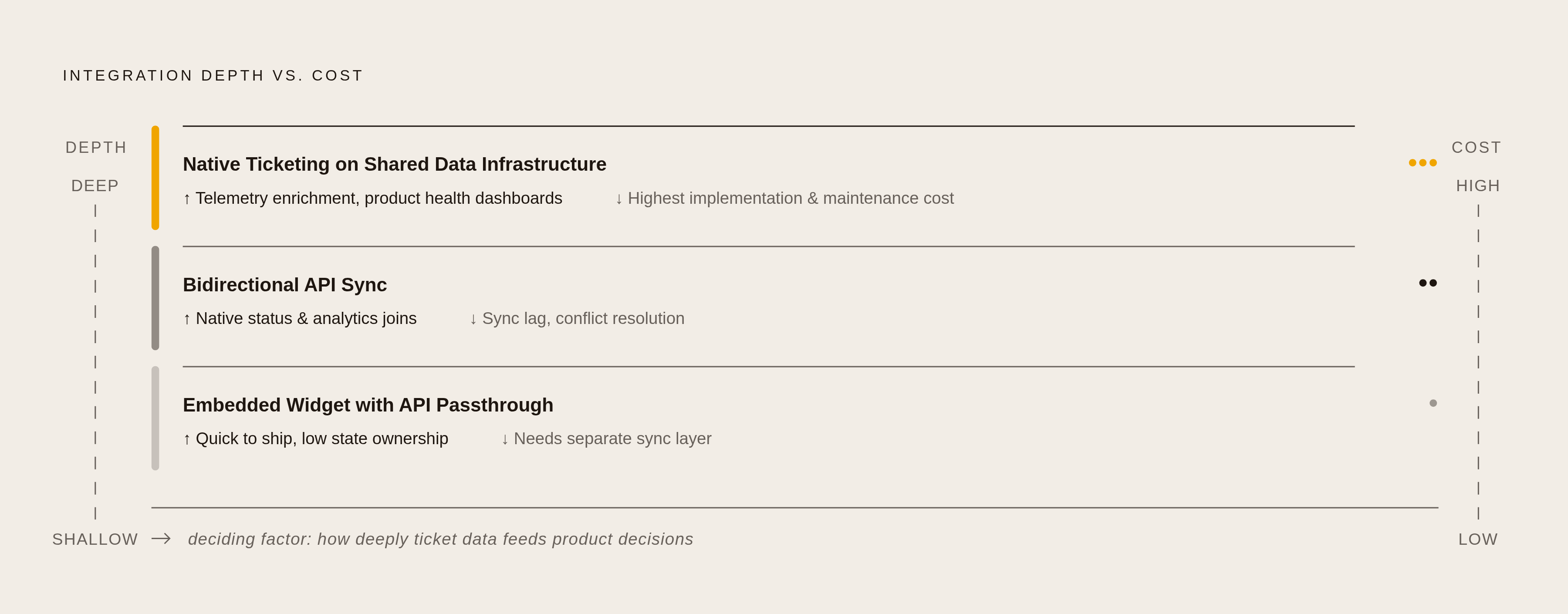
The simplest pattern is an embedded widget with API passthrough. A JS widget or iframe brings the support interface into the product, while the ticketing system owns all state. This is quick to ship and fits early-stage products with low support volume. But native status displays, product events triggered by resolution, and ticket analytics need a separate sync layer.
Bidirectional API sync adds that layer through a shadow record in the product database. REST or webhook APIs keep it aligned with the source of truth, allowing native ticket status, analytics joins, and automation on state changes. An associated ticket closing could mark a feature request resolved. The cost is sync lag and conflict resolution when agents and the product update the same record at once.
Native ticketing on shared data infrastructure goes deeper still. The product and support system share a data store or event bus, making tickets first-class product objects. This supports telemetry enrichment, product-aware routing, and resolution data flowing into product health dashboards. It also carries the highest implementation and maintenance cost. The deciding factor is how deeply ticket data feeds product decisions.
API design choices that determine whether the integration holds under load
Once the pattern is chosen, the API layer must hold up under conditions that the first demo politely avoids. A slow or unavailable webhook endpoint can lose state changes if the integration depends on delivery alone. Put a durable event queue between where webhooks come in and where application logic runs. The webhook writes to the queue, consumers process at their own pace, and the queue handles retries.
Burst traffic creates a different failure mode. A product incident can lead to enough new tickets to hit platform rate limits just when customers most need support. Batch creation requests and use exponential backoff with jitter rather than allowing failures to disappear into the integration. Authentication also needs production treatment, including short-lived tokens with rotation and permissions scoped to the work required. Creating tickets does not justify access to all agent data.
Retries then need protection of their own. Network errors, double-clicks, and client-side retries must not turn one request into several tickets. Tie an idempotency key to the originating user action so repeated creation attempts do not multiply the work. An outage already has enough opportunities to make friends.
Workflow automation: where the integration either compounds value or creates hidden debt
Reliable delivery does not make an automation rule correct. Rules built on weak data can route tickets to the wrong team, close them prematurely, and produce reassuring SLA metrics that hide unresolved problems. Classification must come before routing, using intent, product area, customer tier, and urgency. An AI classifier cannot fill in account health or entitlement context if the integration never sent it.
Ownership needs equally clear treatment. SLA clocks run from creation to resolution, but responsibility can become ambiguous as tickets move between support, engineering, and success. Model the owner as an explicit state on the ticket. Otherwise, automation neatly sends work where no department owns it. Such automation creates maintenance debt dressed as productivity.
Self-service belongs in this design too. AI agents and portals can resolve tier-1 issues before a ticket reaches a person, but the product must surface help in context. That means offering relevant options when the user is about to request support, based on what they were doing. Automation gains value from the same foundation as routing, which is useful data and clear responsibility.
How customer context flows from the product into the support experience
“Let me pull up your account” is the moment a customer learns how much context survived the trip to support. With just an email address, the agent has to piece together the rest. Account ID, subscription tier, and entitlements instead show right away what access the customer has and which SLA applies. Session state and the preceding product action remove the need to start with “what were you trying to do?”.
The product events, error logs, and usage signals tied to the issue give engineering the context to diagnose it without asking the customer to make it happen again. Full conversation history preserves what has already been discussed across channels and sessions. Persistent memory keeps that link to past interactions too, including earlier questions and how they were resolved. The experience feels connected because the information actually is.
For B2B SaaS, the CRM completes the picture with account health, renewal date, and expansion history. A bidirectional connection lets success managers see open tickets before a renewal call. It also lets support agents see renewal risk before deciding how aggressively to escalate.
When support infrastructure becomes a retention signal, not just a cost center
The CRM bridge matters because timing changes what a success team can do. Real-time visibility into ticket volume, sentiment, and unresolved issue age gives the team a chance to intervene before the customer escalates. Support becomes a proactive retention system only when these signals reach the people responsible for the relationship.
Resolution data also shows where the product repeatedly creates friction. Recurring topics can inform roadmap priorities, but only when tags, categories, and product-area fields are consistent enough to query. That pattern is harder to find with only free-text conversation logs to go on. This is the business return on the less glamorous work of defining fields at creation time.
Ticket volume and first-response time cannot capture that return by themselves. Issue recurrence rate, time-to-resolution by account tier, and the correlation between unresolved ticket age and churn expose the retention dimension. Those measures need the analytics connections set up earlier. Audit whether the integration can compute them, rather than assuming a busy support dashboard shows how support affects retention.
Choosing a platform: what the architecture decision actually constrains
Platform selection should follow the integration pattern because it constrains API quality, workflow depth, and how much infrastructure the team must build. For the embedded pattern, Help Scout fits smaller teams that want simple email-first support with a shared inbox, Docs, and workflows. Deep routing, ITSM, and enterprise channel complexity are less suited to that context.
For bidirectional sync, Front starts with the conversation and gives teams tools to work together, run automation, and see the SLA across departments. Freshdesk fits small to mid-sized teams seeking classic ticketing, a knowledge base, automations, and the Freshworks ecosystem, while advanced AI and analytics require higher tiers. HubSpot Service Hub fits teams already using HubSpot CRM through connected customer records, ticketing, automation, and service reporting. Zendesk describes its Resolution Platform as having natively embedded AI, with omnichannel support, app integrations, workforce management, and quality assurance tools. Its enterprise reach comes with growing complexity and cost as seats and AI add-ons increase.
For deep integration, Jira Service Management fits technical and developer-heavy workflows through tight connections to Jira Project Management and Confluence. Its IT service management strengths can feel too technical for customer-facing support. That makes it a context-specific candidate, with shared infrastructure appropriate only when the product needs it.
What a well-integrated ticketing system looks like as a content and knowledge infrastructure
A resolved ticket is a candidate knowledge base article, provided its resolution is structured and retrievable. Repeated issues reveal gaps in documentation, in-product guidance, or agent training. With AI-assisted generation, those resolutions can become articles that AI agents and self-service flows draw on. The loop runs from a well-resolved ticket to a structured article, then to an answer that can prevent a future ticket.
But this loop can also scale poor writing. Responses, articles, and macros generated from ticket data face generic phrasing, inconsistent tone, and a voice that does not match the rest of the product. Customers notice the seam even when they cannot name it. Brand voice therefore needs programmatic enforcement in the generation layer, rather than an exhausted editor standing between every draft and the customer.
Adversarial multi-model review applies the same discipline used for marketing content to support content. A pipeline can write a draft, check that its voice stays consistent and its claims match how the product works, and flag hallucinations before it is published. The harness around the model matters more than the model alone. Support content belongs inside writing quality infrastructure because it is part of the customer-facing product and needs more care than an administrative afterthought would get.
Implementation sequence: how to build the integration without painting yourself into a corner
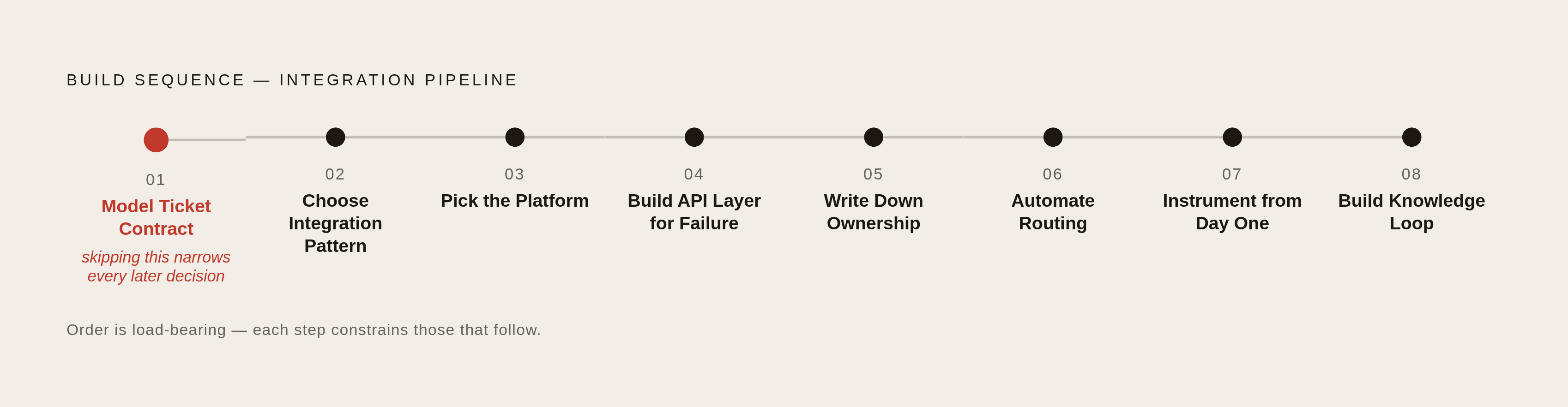
Choosing a platform before modeling the ticket is the mistake that makes every later decision narrower. The initial ticket contract defines creation-time fields, downstream consumers, and the rules that must fire on state changes. That contract should account for future knowledge generation even though the knowledge loop comes last. Otherwise, building it later may call for a migration.
Next, choose the integration pattern based on how much ticket data must shape product decisions, then pick the platform. Build the API layer for failure before adding product-facing features, including the durable queue, rate-limit handling, scoped authentication, and idempotency keys. Write down ownership for every ticket state before automating routing so the rules encode responsibility.
Instrument the integration from day one, then build the knowledge loop on the structured resolutions the system produces. As ticket volume, the product, and team structure change, what the system needs to do will keep changing too. Explicit contracts make that evolution manageable, while measurement makes claims about improvement testable. Track ticket creation latency, webhook delivery failure rate, classification accuracy, SLA breach rate by team, and time-to-resolution by account tier. The integration is complete when its behavior can be measured.