Storing Third-Party API Credentials Securely
Protecting API keys requires knowing which threats each storage method actually prevents.
29 million hardcoded secrets showed up on public GitHub in 2025. That's a 34% jump from the year before, and it's the biggest single-year spike anyone's recorded. The point of this piece isn't to scare you with that number. It's to explain why picking a storage method for API credentials has almost nothing to do with which tool has the best logo, and everything to do with knowing exactly which threat that method shuts down and which ones it quietly leaves open.
AI service credentials grew the fastest of any category, up 81% year over year. This isn't a legacy problem left over from ten years of sloppy PHP scripts. It's happening right now, in the newest parts of the stack, built by developers who read the same security blog posts everyone else did.
Here's the number that actually matters: 64% of secrets confirmed valid back in 2022 were still live and exploitable as of January 2026. Four years of open access. That's not a detection problem. That's a remediation problem. None of this comes from ignorance, either. It comes from developers under deadline pressure making a reasonable-seeming call in the moment, without a clear map of what that call actually protects them from.
API Credentials Are Structurally Different From Passwords
Passwords get hashed. The second you type one in, it turns into a string that's useless to anyone who steals it out of a database. API keys don't get that treatment. They're bearer credentials, meaning whoever holds the string gets the access, no identity check required.
Because the raw value has to travel across the wire to actually work, it has to live somewhere unencrypted at some point in the chain. The threat was never that someone guesses your API key through brute force; nobody's cracking a 40-character random string. The threat is that someone finds it sitting somewhere it shouldn't be.
Third-party credentials make this worse. You don't own the issuing system, so you can't rotate the key yourself; you're stuck making a round trip to somebody else's API and hoping their support team responds quickly. That delay is exactly why hardcoded and mismanaged secrets are categorized as a cryptographic control problem, not merely a developer-hygiene issue, placing them in the same class of failure as weak encryption or bad key management.
Why Hardcoded Secrets Survive After Deletion
Every developer has done this at least once. You're prototyping, you need to hit an API fast, so you paste the key straight into the code with every intention of moving it to a config file later. Then the deadline arrives. The commit ships. The key's in production, sitting in plain sight in the codebase.
Deleting that key from the file doesn't delete it from history. Git remembers. Anyone with clone access can dig through old commits and pull the key right back out, months or years after you thought you'd cleaned it up. Wiz's 2025 State of Code Security Report found 61% of organizations have secrets sitting exposed in public repos right now.
Private repos won't save you either. Internal repos are roughly six times more likely to contain a hardcoded secret than public ones, because "private" feels safe enough that nobody bothers scanning it. That false sense of safety is doing more damage than the public exposure is.
The xAI and DOGE incident from July 2025 illustrates this clearly. A key sitting inside a file called agent.py got pushed to GitHub and granted access to more than 50 different language models. Nobody inside the organization caught it. GitGuardian did, after the fact, scanning public repos. The key was still live after the disclosure went public, which indicates how slowly these things get cleaned up once found.
AI-assisted coding tools are making the problem worse. Code generated with AI assistance leaked secrets at roughly double the rate of GitHub's overall baseline through 2025. An autocomplete tool trained on public code will readily autocomplete a hardcoded key, because that's the pattern it learned from.
Once a credential touches version control, no downstream storage method fixes it. Vaults, encryption, and rotation schedules cannot undo that exposure. The only fix that actually works is catching it before the commit ever happens.
What.env Files Protect and What They Don't
Environment variables solve one specific problem well: they get the secret out of the codebase. If someone clones your repo, they don't automatically walk away with a working credential. That's real progress, and it's why almost every onboarding guide recommends this approach.
But "out of the codebase" is not the same as "safe," and there are at least six ways a.env-stored secret leaks that have nothing to do with a bad commit:
Anyone who can run a process listing on the host can read your environment variables straight out of memory.
Crash reports and error logs sometimes capture the full process environment without anyone asking them to.
Logging pipelines occasionally serialize the entire environment by accident, secrets included.
Running
docker inspecton a container hands over its environment variables to anyone with socket access.Kubernetes Secrets are base64-encoded, not encrypted. Base64 is an encoding, not a lock. Anyone who can read the object can read the secret.
Terraform state files store secret values in plain text, which makes your state bucket one of the most sensitive assets your team owns, whether anyone treats it that way or not.
Environment variables also give you zero audit trail. There's no record of who read a value, when it changed, or where it ended up. If something goes wrong, you're not investigating; you're guessing.
Collaboration tools introduce a failure mode most teams don't anticipate. Roughly 28% of secrets incidents trace back not to a repository at all, but to a Slack message, a wiki page, or a ticketing system where someone pasted the contents of a.env file while debugging. GitGuardian found leaked secrets sitting in 2.4% of corporate Slack channels.
CI/CD runners are their own category of risk. In the Shai-Hulud 2 attack, 59% of the machines compromised were CI/CD runners, and each one carried an average of eight copies of the same live secret scattered across shell history, IDE configs, cached tokens, and build artifacts.
Environment variables beat hardcoding, but treating them as the final destination for your secrets means accepting a set of risks, not closing them. Teams that stop at.env files have made a choice, whether they realize it or not.
What Each Secrets Manager Layer Actually Protects
Tools like AWS Secrets Manager, HashiCorp Vault, GCP Secret Manager, Azure Key Vault, Doppler, and Infisical share a core set of protections, and each one closes a distinct threat.
Encryption at rest and in transit means that even if someone gets into the underlying storage, they're looking at ciphertext rather than a usable key. Industry best practice calls for strong authenticated encryption at rest and TLS covering everything in motion. Policy-based access control issues secrets to identities, service accounts, and roles instead of pasting them into a shared config file that multiple people can access, which closes the over-sharing problem. Full audit logging records every single retrieval, filling in the exact gap environment variables leave open: who touched what, and when. Rotation automation lets you cycle secrets on a schedule or trigger, which directly addresses that 64% remediation-gap statistic.
None of this touches the application layer. If your app fetches a secret from Vault and then logs its own request headers into a debug file, the vault did its job correctly and you're still exposed. Storage tools protect storage. They don't protect bad application code.
Cloudflare's 2024 incident shows what rotation automation actually buys you. Service tokens left over from a prior breach gave attackers a way back in, and cleaning it up required rotating credentials company-wide. An automated rotation policy tied to a breach signal would have shut that door before it became a company-wide cleanup effort.
Samsung Germany shows the other side: credentials stolen in 2021 sat untouched for four years before they were used in a breach affecting 270,000 records in 2025. The tooling to rotate them almost certainly existed. The rotation policy was never enforced. A secrets manager doesn't enforce its own policies; people do that part.
A widely held best practice is splitting production and development secrets into entirely separate systems, so a leaked dev key doesn't provide access to production. Secrets managers also carry real costs: latency on every retrieval, a new dependency you rely on for uptime, and genuine operational complexity. That's a fair trade for a lot of teams, but it's not free, and it shouldn't be adopted just because it appears on a checklist.
Scope Restrictions and Short-Lived Credentials
Storage keeps a secret safe while it sits still. It does nothing once that secret is out in the world, whether it was issued legitimately or stolen. That requires a different set of controls.
The BeyondTrust and US Treasury breach in December 2024 illustrates the gap. One compromised API key opened access across an entire remote support service, a consequence of credentials carrying broader permissions than any single integration actually needed.
Scope restriction addresses this directly. Lock credentials to specific IP ranges, specific HTTP methods, and specific endpoint paths wherever the issuing API provides that option. Grant the minimum level of access the integration actually requires, not the broadest tier available because it was the default. If the API offers a scoped token alongside a master key, use the scoped token. Master keys with unrestricted permissions are exactly what attackers want to find.
Short-lived and dynamic credentials address the persistence problem. A credential that expires in twenty minutes is far less useful to an attacker than one that works indefinitely. Some secrets managers can generate dynamic credentials on demand, unique to each caller, that expire automatically after use. At that point, there's no static secret sitting in storage to steal. That approach would have prevented the four-year Samsung Germany scenario more effectively than any rotation schedule, because there would be nothing sitting still long enough to go stale.
The Rabbit R1 incident from June 2024 shows what scope restriction buys you in a worst-case scenario. Hardcoded keys in that device could have exposed every past response the assistant had ever generated. Proper scoping wouldn't have stopped the key from leaking, but it would have limited what an attacker could pull once they had it.
One important caveat: not every third-party API offers scoped tokens or short-lived credentials. Some vendors only give you one type of key, and it does everything. So the first question when integrating any new API shouldn't be where to store the credential. It should be what kinds of credentials the API actually offers.
Overlooked Attack Surfaces: CI/CD, MCP, and Chat Tools
CI/CD pipelines deserve specific attention. The 59% figure from the Shai-Hulud 2 attack, combined with the average of eight live secret copies per compromised machine, indicates these runners have become a priority target, and most storage guides don't address them. Secrets injected as environment variables into a build job can get printed into logs by a rogue dependency or a careless debug step. Build artifacts and Docker image layers can bake in environment variables at build time, and once that image ships to a registry, the secret ships with it. Third-party pipeline plugins with repository access present a quieter risk, capable of exfiltrating a secret without anyone noticing until much later.
MCP config files are the newest entry on this list. GitGuardian found 24,008 unique secrets sitting in public MCP-related config files on GitHub, and 2,117 of them were confirmed valid, working credentials, representing 8.8% of everything found in that category. Many MCP setup guides still instruct users to put API keys straight into config files or command-line arguments, which produces the same exposure as hardcoding.
Collaboration tools round out the list. That 28% figure on incidents originating from Slack, Jira, Notion, and similar tools is significant. A credential pasted into a debugging thread doesn't disappear after the conversation ends; it sits there, searchable, often visible to a much wider audience than the one person who needed to see it.
A Truffle Security scan of roughly 400 terabytes of Common Crawl data, covering 2.67 billion web pages, turned up close to 12,000 live secrets: valid, working API keys and tokens sitting in public web pages, successfully authenticating against real services.
The fix for each surface is specific. CI/CD platforms have native secrets stores, including GitHub Actions secrets and GitLab CI variables with masked output; use them, and audit any third-party action before granting it repository access. MCP configs should receive the same pre-commit scanning treatment as source code, because they present the same risks. Collaboration tools need a clear rule: credentials are never pasted into chat or tickets, enforced with periodic automated scanning of Slack and internal wikis.
Detection and Rotation After Prevention Has Failed
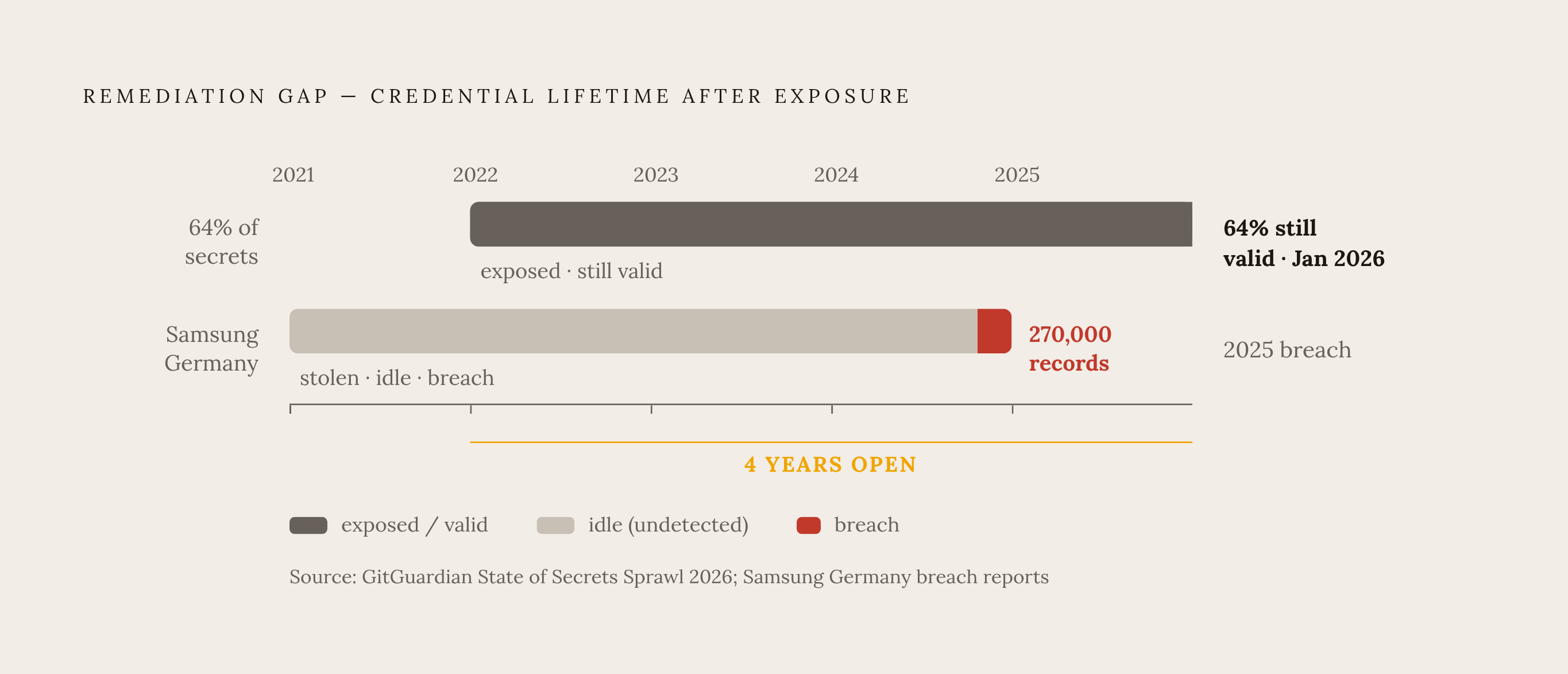
That 64% remediation-gap number means that right now, credentials exposed back in 2022 are still sitting valid and usable by anyone who found them. Samsung Germany puts a concrete cost on that gap: four years between the initial theft and the eventual breach of 270,000 records. The failure wasn't a storage choice. It was the absence of any process to detect the exposure or force a rotation once it happened.
Pre-commit scanning is the earliest point where exposure can be stopped. Tools like GitGuardian, truffleHog, and git-secrets scan a commit before it ever reaches the remote server. The xAI key was only caught after the push went public; a pre-commit hook would have caught it before it left the developer's machine. That's the point in the chain where the problem gets avoided entirely rather than managed afterward.
Continuous repository scanning covers secrets that already made it into history, checking every branch and old commit, not just the newest pushes. GitHub's own built-in secret scanning flagged 39 million secrets in 2024, which provides a useful baseline, though not a complete solution.
Rotation strategy matters as much as detection. Scheduled rotation beats no rotation, but it still leaves a gap between the moment a leak is discovered and the next scheduled cycle. Cloudflare's 2024 response required rotating credentials company-wide precisely because no automated trigger existed to contain things earlier. If detection had been wired directly to rotation, the blast radius would have stopped at the original breach. Where the third-party API allows it, connect the detection alert directly to automated revocation and reissue so the window closes in minutes rather than days.
The financial case for this layer is straightforward. A single incident tied to an exposed API key averages $650,000. In financial services specifically, that average climbs to $832,800 per breach, against a sector already absorbing more than $4 billion a year in API-related fraud losses.
Detection is a compensating control, not a replacement for good storage practices. Detection without fast rotation is just a notification that something went wrong, with no remediation attached. Rotation without detection is a mechanism with no trigger to activate it.
Matching Storage Method to Your Actual Threat Model
The question isn't which storage tool to use. It's which threats you're actually exposed to and which controls close them.
Ask what happens if the repository leaks. Ask what happens if the host gets compromised. Ask what happens if the credential gets stolen while it's legitimately in use. Each of those is a different threat, and each one is addressed by a different control: never committing the secret in the first place, moving it out of the codebase and into a proper secrets manager, and then scoping and shortening the credential's lifespan so a theft doesn't produce years of quiet access.
Storage method, access control, and credential lifetime aren't three competing options to choose between. They're three separate controls addressing three separate threat vectors. Skipping one because another is strong doesn't make you safer; it just determines which threat you've left unaddressed.